Why camp in a Tesla?
A first Tesla camping night needs five things: a site that allows overnight stays, a charge buffer, bedding for the forecast, a mattress that fits and Camp Mode switched on in Park. Camp Mode stops when the car enters Low Power Mode, at 20% by default, so arrive with enough charge for the night and the drive to a charger. Try it close to home first.
A Tesla can provide a flat cargo area and parked climate control for an occupied overnight stop. The practical advantages are compact shelter, no idling combustion engine and access to the car's live charge display.
Those advantages do not make the cabin fail-safe. Use a legal site, keep an exit clear, carry bedding suitable for the forecast and never use a fuel-burning stove or heater inside the vehicle.
- No engine, no fumes
- The car has no tailpipe exhaust while parked, but the cabin still needs normal safety planning. Never use fuel-burning heaters or stoves inside, and do not assume climate control cannot fail.
- Whisper-quiet operation
- There is no idling combustion engine, but the HVAC fan, pumps, exterior activity and periodic system noises can still disturb sleep. Test the parked setup close to home if you are sensitive to sound.
- All-season climate control
- Climate demand varies with weather and vehicle condition. Carry bedding suitable for the forecast and monitor charge instead of assuming one setting will be maintained indefinitely.
What is Camp Mode & how it works
Camp Mode is Tesla’s parked climate-and-power setting for people remaining in the vehicle. Features can vary by model, market and software version. For the setup, battery use and limits, read how Tesla Camp Mode works.
Tesla states that Camp Mode can maintain climate and power USB and low-voltage outlets. The touchscreen stays available. Sentry Mode, the alarm and Walk-Away Door Lock are inactive, so lock deliberately.
How to activate Camp Mode
With the vehicle in Park, open the current climate controls and follow the Camp Mode steps shown in your car. Interface details can change with software updates.
- Open climate controlsTap the fan icon or temperature display at the bottom of your touchscreen to open the climate control panel.
- Set your temperatureChoose a cabin temperature appropriate to the occupants, weather and any health considerations. There is no universal best sleeping setpoint.
- Tap the Camp iconLook for the tent icon along the bottom row of the climate panel. Tap it to activate Camp Mode.
- Confirm activationConfirm Camp Mode is active and continue monitoring it. Tesla documents conditions in which climate may stop, so keep suitable bedding and a backup plan.
Battery usage overnight
Tesla publishes no fixed rate. Our calculator estimates 3.4–7.0 kWh over eight hours when the cabin is 0–4 °C warmer or cooler than outside, and 12.2–22.6 kWh when the gap is over 28 °C. That is 5–9% to 16–30% of a 75 kWh battery. These are editorial estimates, so run Camp Mode for one hour while awake to find your own rate.
Camp Mode stops when the car enters Low Power Mode, at 20% by default (Tesla lets you set 10–20%). Plan to wake above that threshold with enough range left to reach a charger.
What Camp Mode keeps running
Tesla documents several systems that can remain available while Camp Mode is active. Availability depends on the vehicle, software, battery state and operating conditions, so confirm the live state in your own car.
- HVAC attempts to maintain the selected temperature while the system and battery permit
- Interior lights can remain controllable while Camp Mode is active
- Supported USB and low-voltage outlets can remain powered; verify the outlets in your vehicle
- The touchscreen can remain available while Camp Mode is active
- Supported media playback can remain available, subject to the vehicle's current software and power state
Questions to settle before the first night
- Camp Mode and battery
- Follow the steps to turn on Camp Mode and how much battery a night uses, or run the Camp Mode battery calculator.
- Where and when
- Check where camping in a Tesla is allowed and whether you can sleep while charging. To plug in at a campsite, read how to charge your Tesla at a campsite.
- Weather
- To stop condensation on the windows and plan winter camping, read those answers first.
- Family
- Parents can read Tesla camping with kids.
- Mattress and gear
- Not sure you need a mattress? Start with do you need a mattress for Tesla camping, then build a packing list. If you have Tesla's inflatable mattress, the Tesla air mattress guide covers inflation, the pump and returns.
- Shelter
- For more room outside the car, compare Tesla camping tents that attach to the car or sit on the roof.
- Guides by car
- If you have not chosen a car, read which Tesla is best for camping. Then see the guides for Model Y mattresses, Model 3 mattresses and Cybertruck mattresses.
Essential gear checklist
Start with site legality, forecast, charge reserve, suitable bedding, privacy and a clear exit. A fitted mattress and other comfort accessories are optional.
Core essentials
- Tesla-specific mattress. A pad can add cushioning. A fitted design may use the cargo outline more efficiently, but a measured generic pad can also work; neither format guarantees comfort.
- Window shades or covers. Shades can reduce light and visibility into the cabin. Confirm their fit and keep at least one usable exit and any required visibility unobstructed. Compare sets in the Tesla camping window shades guide.
- Sleeping bag or bedding. Bring bedding suitable for the forecast even if you plan to use Camp Mode. Climate can become unavailable, and ordinary home bedding may be inadequate in cold or extreme weather.
- Pillow. Bring your actual pillow from home — it makes a surprising difference. Compressible camping pillows work too if space is tight.
Nice-to-have extras
- USB-powered fan. A small USB fan can provide direct airflow and white noise. Confirm that the selected outlet remains powered and do not let the fan block ventilation or an exit.
- Cargo organizer. Keeps shoes, water bottles, and personal items tidy and accessible. Hangs from the front seat headrests for easy reach.
- Headlamp or small light. Useful for late-night bathroom trips without fumbling with your phone. A red-light mode preserves your night vision.
- Portable power bank. A charged power bank gives phones and lights an independent backup if a vehicle outlet is unavailable.
- Compact cooler. A small soft cooler fits in the front footwell and keeps drinks and snacks cold. Especially handy for multi-night trips.
Nothing extra if you already own bedding and a pad that fits. Fitted mattresses start at $225 (Tesla’s Model Y mattress) and $239 (NovaPads Air-Foam Pro); our pick, Snuuzu Model Y, is $899. Test what you own on a first night before buying.
Step-by-step setup guide
Use the same safety-first order each time: verify the site and charge plan, keep an exit clear, configure the cabin, activate Camp Mode and confirm the live vehicle state before arranging bedding.
- Plan a charge reserveCheck the forecast, vehicle alerts, remaining charge and route to a charger. Leave a conservative buffer based on your car and conditions.
- Find your spotUse a designated campsite or another location whose current rules allow overnight vehicle occupancy. Park safely and keep exits clear.
- Fold rear seats flatDrop both rear seats using the levers in the trunk. Make sure they click fully flat — a partial fold creates an annoying ridge under your mattress.
- Lay your mattressSet up a pad or mattress while parked. Confirm that it does not block doors, latches, seat controls or ventilation paths.
- Install window shadesInstall only the shades that fit securely without blocking a usable exit or required visibility. Coverage can reduce light and outside views into the cabin, but it does not guarantee privacy.
- Set up beddingLay out your sleeping bag, sheets, or duvet. Place your pillow at the tailgate end or the front seat end — try both and see which you prefer.
- Activate Camp ModeIn Park, open climate controls and select Camp. Confirm the intended settings, deliberately lock the car and continue monitoring charge and climate.
Morning routine: packing up
Pack in an order that keeps one exit usable: remove bedding and shades, stow the complete mattress kit, restore the seats and confirm charge before driving. Time varies with the setup.
- Fold beddingRoll up your sleeping bag or fold your duvet. Stuff it into the front passenger seat or a compression bag.
- Remove mattressIf using an air mattress, deflate and roll it. Foam mattresses fold in half and store in the sub-trunk or front trunk. Some fit right behind the rear seats when raised.
- Remove window shadesPull down your shades and stack them flat. Most Tesla-specific sets come with a storage bag that keeps them organized.
- Raise rear seatsPull the seat backs up until they click into the upright position. Give the cargo area a quick wipe if needed.
- Check battery & navigateCheck your remaining battery level and navigate to your next stop or nearest charger. Camp Mode automatically turns off when you shift into Drive.
Plan your morning charger before you go to sleep. Open the Tesla navigation, search for Superchargers near your route, and save the location. This way you're not scrambling for a charger with low battery while still half-asleep.
Recommended mattresses for beginners
A mattress may improve cushioning and leveling, but it is not mandatory. Snuuzu Model Y is the one we recommend first; the two Havnby options cover other cars and lower budgets.
1Snuuzu Model Y: our pick, a real mattress for your first night
Snuuzu · Foam + air
Snuuzu Model Y
Our rating 97
Our pick Why our pick
Evidence: Owner-tested: the operator’s own unit, bought in 2025 and shown in a one-year video review on 11 May 2026. Specs are Snuuzu’s; no lab or instrument measurements.
- Size
- 205 × 130 cm
- Depth
- 20 cm
- Weight
- 10.6 kg
- Pump
- Removable rechargeable USB-C pump (two in the current EU box, one in the US box list)
- Fits
- Model Y
$899 / €899
Checked 16 Sep 2026
EU store pre-order, ships in November: €849 (29 Sep)
AWDCAMPER10% off · cart-tested on this product, 16 Sep 2026
Affiliate links: we may earn a commission at no extra cost to you.
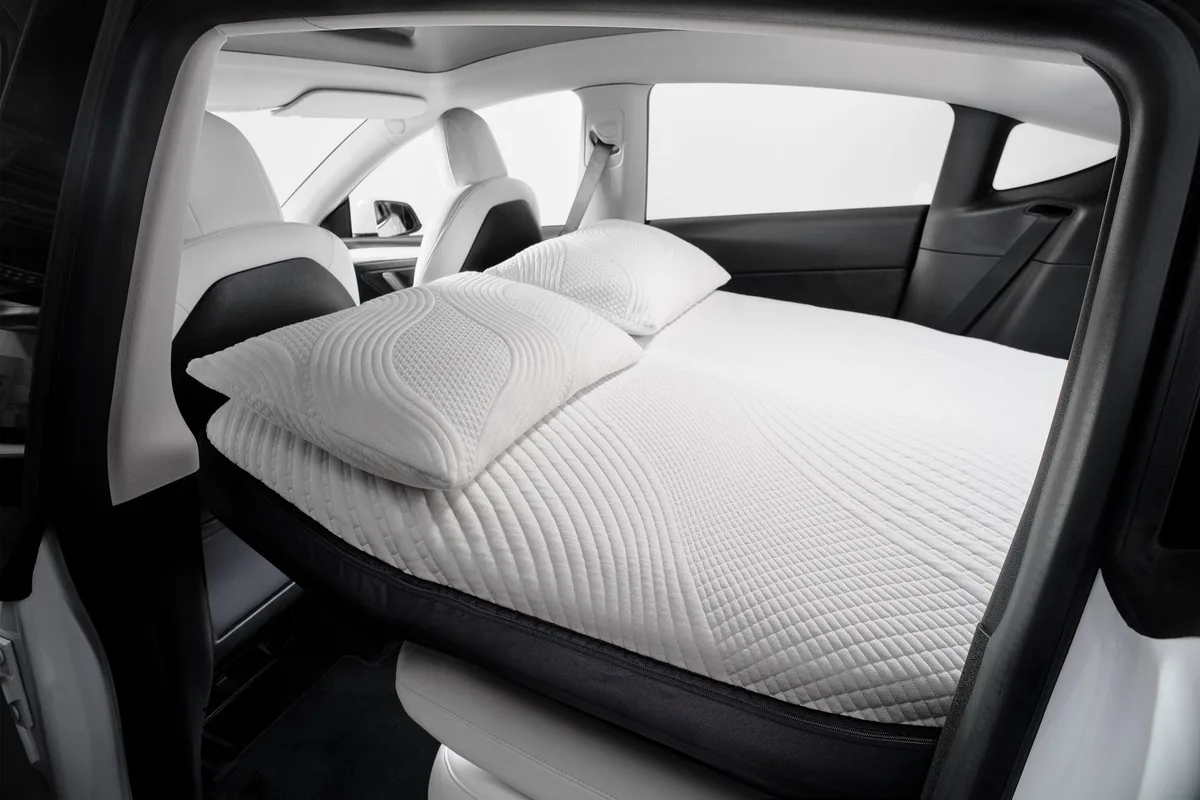
Snuuzu Model Y is the one we recommend first. You sleep on a real mattress: Snuuzu describes an organic Tencel topper, comfort foam and a 3D air mesh on top, while a shaped air layer underneath levels the floor and absorbs its height differences. It is 20 cm deep, covers 205 × 130 cm and inflates with a removable rechargeable USB-C pump. At €899/$899 and 10.6 kg it is a premium purchase, and the one we think is worth it if you plan to camp more than once. The site’s operator owns one and reviewed it on video (11 May 2026); that is owner experience, not a measured sleep test.
2Havnby CloudCore: cross-model option
Havnby · Foam + air
Havnby CloudCore Foam Mattress
Our rating 80
Evidence: Official Havnby material only, checked 19 August and re-checked 16 and 29 September 2026. No hands-on result.
- Size
- 193 × 132 cm
- Depth
- 11.5 cm
- Weight
- 3.95 kg
- Pump
- Built-in pump; cordless rechargeable in stock, 12V vehicle-plug version sold out (16 and 29 September 2026)
- Fits
- Model S (2023–2026 only), 3, X and Y variants
- Warranty
- 3 years + 60-day trial
$399
Checked 29 Sep 2026
AWD10% off · cart-tested on this product, 12 Sep 2026
Affiliate link: we may earn a commission at no extra cost to you.
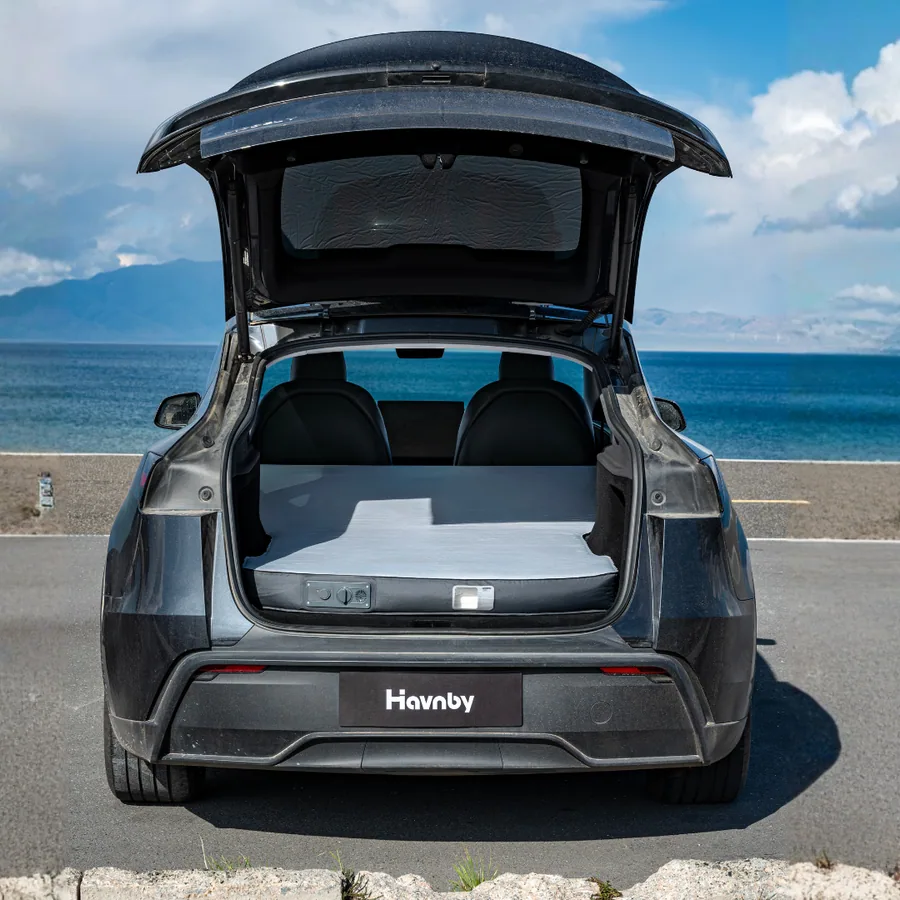
CloudCore is the current Havnby foam-and-air mattress with variants for four Tesla models. Its built-in pump simplifies a first setup, but you must select the exact car and model year.
3Havnby FlatCore: shaped Model Y option
Havnby · Air-foam hybrid
Havnby FlatCore Foam Mattress
Our rating 83
Evidence: Owner-tested: the operator’s own unit, shown in a comparison video of 15 July 2026. Specs are Havnby’s, checked 19 August and re-checked 16 and 29 September 2026; no lab or instrument measurements.
- Size
- 193 × 132 cm
- Depth
- 19 cm max, 7.9 cm min
- Weight
- 5.1 kg
- Pump
- Built-in 12V ABS pump
- Fits
- Model Y, separate year-range options
- Warranty
- 3 years
$549
Checked 29 Sep 2026
AWD10% off · cart-tested on this product, 16 Sep 2026
Affiliate link: we may earn a commission at no extra cost to you.
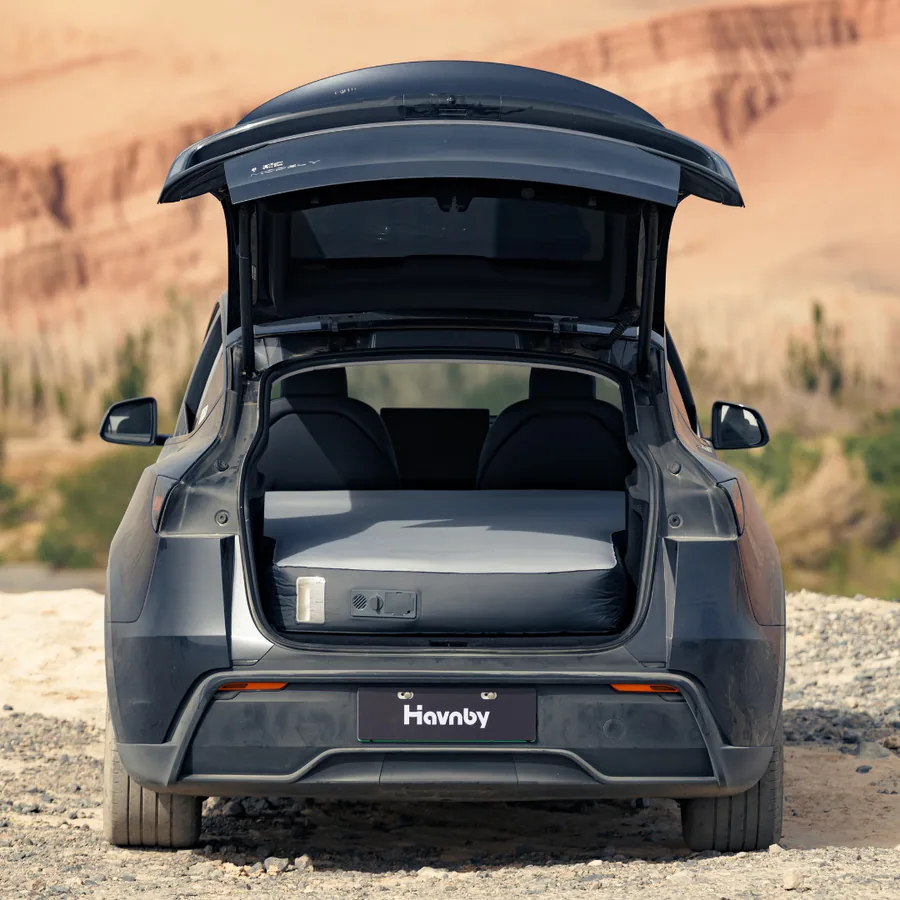
Havnby FlatCore is a $549 Model Y system (16 September 2026) with a shaped 19 cm to 7.9 cm profile and a built-in 12V pump. The operator owns one. It is shaped, not an automatic sensor-leveling mattress.
- Built-in 12V pump; 80-second inflation is a seller claim
- Shaped support profile for the folded-seat slope
Use the full review index to compare these examples with other current options, then verify the exact vehicle variant and live terms. See all Tesla mattress reviews
7 common mistakes beginners make
Before the first night, check charge reserve, shades, measured pad fit, Camp Mode status, parking level, a close-to-home trial and the amount of gear in the cabin.
- Starting with too little batteryDo not arrive with a marginal charge and no backup. Camp Mode consumption varies; plan a conservative reserve and an accessible morning charger.
- Skipping window shadesPrivacy and light control matter, but use shades that do not obstruct required visibility or an emergency exit. Choose the level of coverage appropriate to the site.
- Using the wrong mattressA generic pad may leave gaps, while a fitted mattress may cost more and work only in one vehicle. Measure both options before deciding.
- Forgetting to activate Camp ModeUse the current owner manual to activate Camp Mode. Confirm it remains active and remember that Sentry Mode, the alarm and Walk-Away Door Lock are inactive.
- Parking on a slopeA level legal campsite can improve comfort. Do not trade safe parking or site rules for a flatter surface.
- Not doing a test run at homeRun the first trial close to home or another easy exit. Test the layout, charge consumption and bedding while help and alternatives are available.
- Overpacking gearStart with the gear required for safety, weather and site rules. Add comfort accessories only after the first controlled trial shows what is missing.
Never sleep in a combustion vehicle with its engine running, and never use a combustion heater or stove inside any vehicle. A parked Tesla has no idling tailpipe, but weather, battery state, climate-system faults, blocked exits and air quality still require active planning and monitoring.
Frequently asked questions
How much battery does Tesla Camp Mode use overnight?
Tesla publishes no fixed figure. Our calculator estimates 5–9% of a 75 kWh battery over eight hours in mild weather and 16–30% when the cabin is over 28 °C warmer or cooler than outside. Run Camp Mode for an hour while awake to find your own rate.
Can I run Camp Mode all night without the engine running?
Yes. A Tesla has no engine: Camp Mode runs the climate from the battery in Park until you shift out of Park, turn it off, a climate fault occurs or the car enters Low Power Mode (20% by default).
What's the minimum gear I need to start Tesla camping?
At minimum, choose legal overnight parking, suitable bedding, a comfortable pad if needed, privacy and a conservative charging plan. A fitted Tesla mattress is optional.
Do I need to keep my Tesla in Park for Camp Mode?
Camp Mode is available in Park. Tesla says it attempts to maintain climate until you shift out of Park, turn it off or the system can no longer continue.
Is Tesla camping safe in terms of carbon monoxide?
An electric drivetrain avoids tailpipe exhaust from an idling engine, but that does not make every overnight setup risk-free. Never use a combustion heater or stove inside, keep exits clear and follow Tesla’s climate warnings.
Plan a conservative first night, test the stationary layout and use the product reviews only after you know the vehicle, sleeper and storage constraints.